


Examples
Contribute to Electronic Approval
Connect the Workshop Note binding, business-form widget, and App-owned submission endpoint to the Approval composer.
Example type Recipe
Overview
Contribute to Electronic Approval
This recipe connects the Workshop Note from the previous recipes to the real
Electronic Approval composer. The Descriptor recipe
published the Submit Note choice; this recipe joins its Slot Widget,
frontend controller, and App-owned submission endpoint with the same identity.
What appears when you finish
| Contribution | Screen or capability |
|---|---|
WorkshopApprovalSlotWidgets | Connects Workshop to Core's business-form composer slot |
| Frontend registry and Widget | Note selection, name/status preview, and submit readiness |
| App submission endpoint | Reauthorizes the actor and Note, then creates a Core Approval case |
| Published Legal Entity template | Workshop business form under E-Approval → Create E-Approval request |
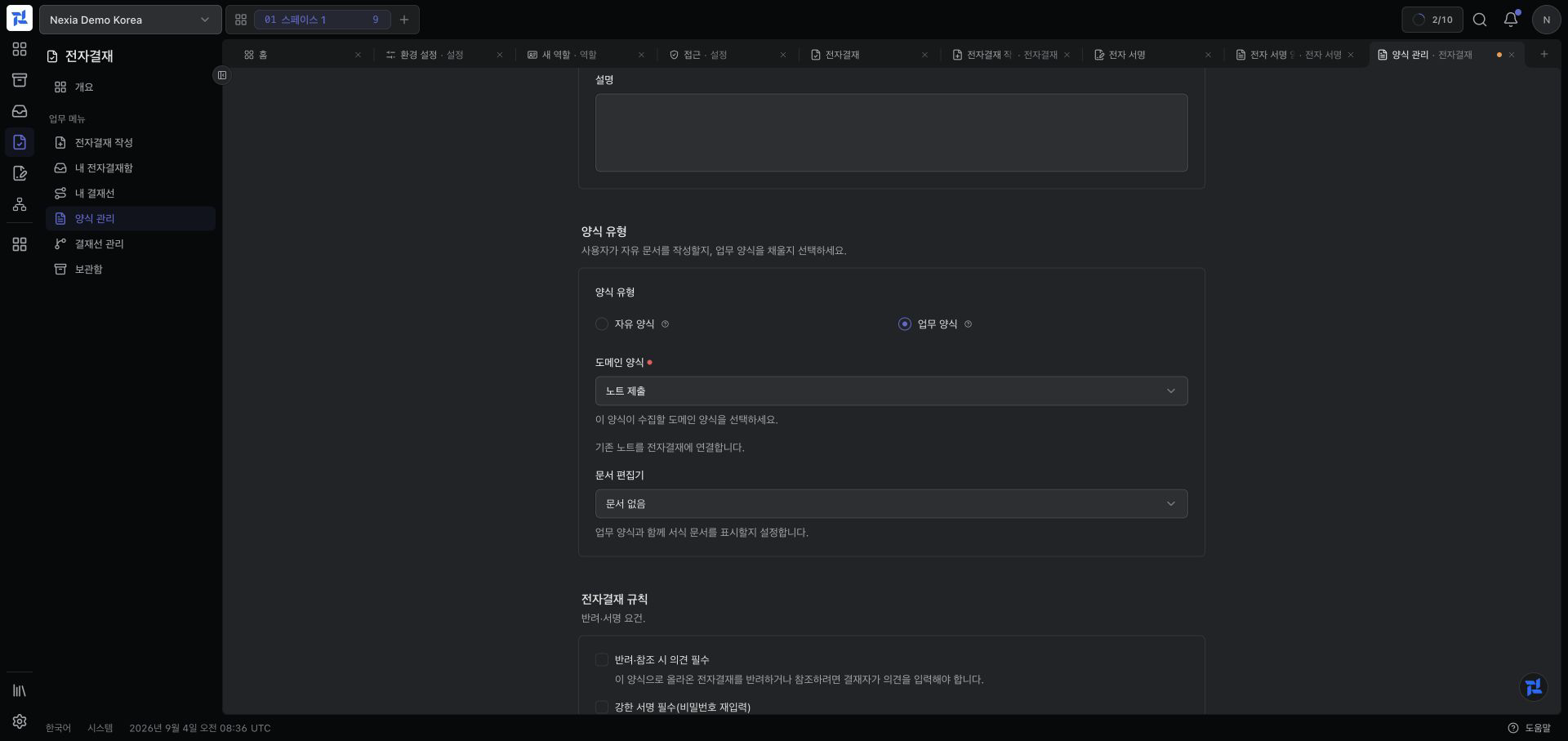
The screenshot is the actual template form after selecting Submit Note from the Descriptor catalog. The App description, “Link an existing note to Electronic Approval,” appears below the selection. It reaches the end-user creation catalog only after an administrator creates and publishes this template.
How three contracts connect to Core's composer flow
This feature is not completed by extending one class. It connects three
boundaries through the same workshop.note.submit identity.
| Boundary | What Workshop implements or registers | What Core processes |
|---|---|---|
| Static UI contract | WorkshopApprovalSlotWidgets implements AppDescriptorContribution | AppDescriptorCatalog and SlotWidgetCompositionResolver check App installation, slot API version, lifecycle, and permission |
| Browser contract | approvalComposerBusinessFormRegistry.register(...) and an ApprovalBusinessFormSlotPropsV2 controller | The composer loads the Widget by component key and hosts the shared approval line, draft, preview, and submit lifecycle |
| Submission contract | The App endpoint receives Nexia\Approval\Contracts\ApprovalHost by dependency injection | Core's CoreApprovalHost implements ApprovalHost validates the binding and template and creates the Approval case and audit evidence |
Published Legal Entity template
→ Core composer reads the binding formWidgetKey
→ SlotWidgetCompositionResolver selects an allowed Slot descriptor
→ frontend registry loads the Workshop Widget with the same key
→ Widget calls the App submission endpoint
→ App rechecks the Note, Policy, and revision
→ ApprovalHost::submitBound()
→ CoreApprovalHost creates the Core Approval caseThe App endpoint neither imports nor extends CoreApprovalHost. Its constructor
receives the SDK ApprovalHost interface, which the Core host binds to the
CoreApprovalHost implementation. This boundary keeps Core unaware of the
Workshop model and keeps Workshop away from Core Eloquent models.
1. Add the Slot Widget Descriptor
cp docs/developers/examples/approval-contribution/WorkshopApprovalSlotWidgets.php \
packages/workshop/src/Descriptors/WorkshopApprovalSlotWidgets.phpFour identities must match exactly:
Approval binding formWidgetKey
= Slot descriptor key
= Slot descriptor component
= frontend registry key
= workshop.note.submitThe descriptor fills Core's approval.composer.business_form slot and gates
visibility with workshop.note.publish.
2. Register the frontend Widget
Add the public App SDK registry call to packages/workshop/resources/js/index.ts:
import { approvalComposerBusinessFormRegistry } from '@nexia/sdk/host';
approvalComposerBusinessFormRegistry.register(
'workshop.note.submit',
() => import('./approval/WorkshopNoteApprovalWidget'),
);WorkshopNoteApprovalWidget receives ApprovalBusinessFormSlotPropsV2, loads
the Note, and registers the composer controller:
registerController({
canSubmit: note !== null && note.status === 'active',
saveDraft: async () => ({ appDraftRef: note.public_id }),
buildPreview: () => ({
title: note.name,
sections: [{
title: t('workshop.approval.note.document.summary'),
fields: [
{ key: 'name', label: t('workshop.note.name.label'), value: note.name },
{ key: 'status', label: t('workshop.note.status.label'), value: note.status },
],
}],
}),
submit: async (envelope) => {
const response = await api.post(
`/legal-entities/${legalEntityPublicId}/workshop/notes/${note.public_id}/submit-approval`,
{
template_key: envelope.templateKey,
template_version: envelope.templateVersion,
line: envelope.line,
reference_user_ids: envelope.referenceUserIds,
circulation_user_ids: envelope.circulationUserIds,
},
);
return { caseId: response.data.approval_case.public_id };
},
});This shortened excerpt shows the controller boundary. A production Widget also handles loading, not-found, denial, idempotency, staged attachments, and error states. The browser calls an App endpoint, not a Core Approval endpoint.
3. Reauthorize and submit in the App
The App endpoint resolves the Note within the Legal Entity and rechecks the
workshop.note.publish Policy. It locks and verifies current state and revision
before using the App SDK ApprovalHost:
$case = $this->approvals->submitBound(
new BoundApprovalSubmission(
legalEntity: $legalEntity,
drafter: $actor,
templateKey: $input['template_key'],
templateVersion: (int) $input['template_version'],
bindingKey: 'workshop.note.submit',
bindingVersion: '1.0',
resourceRef: new ResourceRef(
appKey: 'workshop',
resourceKey: 'workshop.note',
resourceId: (string) $note->public_id,
display: $note->name,
href: '/apps/workshop/notes/'.$note->public_id,
),
resourceVersion: (string) $note->updated_at->getTimestamp(),
documentValues: [
'name' => $note->name,
'status' => $note->status->value,
],
lineDefinition: $line,
title: $note->name,
),
);The App owns the Note and its Policy; Core owns approval lines, cases, and audit evidence. Neither side imports the other's model.
4. Publish the template and observe it
- Under E-Approval → Template management → New template, choose Business form.
- Select Domain form → Workshop → Submit Note.
- Set its name, Legal Entity scope, and approval rules, then create and publish it.
- Open E-Approval → Create E-Approval request and choose the published Workshop form.
- Link a Note and confirm its name/status beside the shared approval line.
- Submit and confirm navigation to the created Approval case.
A binding by itself is intentionally absent from the end-user creation catalog. That catalog lists published Legal Entity templates, not every active descriptor.
5. Inspect discovery
sh docs/developers/examples/approval-contribution/verify.shStatic contribution verification is complete when the script prints
Workshop Approval contribution discovered and validated.
Common errors
| Symptom | Cause | Fix | Confirm |
|---|---|---|---|
| Submit Note is absent from the domain-form catalog | Workshop is not installed, submit authority is absent, or binding lifecycle or locale resolution fails | Check installation in the same tenant, workshop.note.publish, an Active binding, and its locale keys | Workshop → Submit Note is selectable as a domain form |
| The domain form exists but the creation catalog has no entry | The binding exists, but no Legal Entity template has been created and published | Create and publish the Workshop domain-form template in that Legal Entity | The published template appears under Create E-Approval request |
| The composer cannot resolve the Widget | The binding, Slot descriptor, and frontend registry use different component identities | Set all four identities to workshop.note.submit and refresh the frontend | The composer loads the existing-Note selection Widget |
| Submission is denied | The App Route guard, Note Policy, revision, or Access Grant scope check fails | Recheck workshop.note.publish, Note state and revision for the current actor and Legal Entity | Successful submission navigates to the created Approval case |
Verify behavior across settings
This Workshop example verifies a minimal contribution. It does not automatically add configurable approval requirements or default procedure installation. Read Electronic Approval for the developer's enforcement obligations and the administrator's form, line, and requirement setup. Then follow the real purchase flow in Business Process to compare automatic inputs, human review, required versus optional approval, line preparation, outcome branches, and supplied-template updates in one journey.
Included files
Approval Slot Widget descriptor
docs/developers/examples/approval-contribution/WorkshopApprovalSlotWidgets.php<?php
declare(strict_types=1);
namespace Amuzcorp\Nexia\Workshop\Descriptors;
use Nexia\AppDescriptors\AppDescriptorSet;
use Nexia\AppDescriptors\Contracts\AppDescriptorContribution;
use Nexia\AppDescriptors\DescriptorStatus;
use Nexia\AppDescriptors\SlotWidgetDescriptor;
final class WorkshopApprovalSlotWidgets implements AppDescriptorContribution
{
public static function appDescriptors(): AppDescriptorSet
{
return AppDescriptorSet::of(
new SlotWidgetDescriptor(
key: 'workshop.note.submit',
version: '1.0',
slot: 'approval.composer.business_form',
component: 'workshop.note.submit',
slotApiVersion: 2,
status: DescriptorStatus::Active,
permission: 'workshop.note.publish',
labelKey: 'workshop.approval.note.submit.label',
),
);
}
}Refresh and verify the Workshop contribution
docs/developers/examples/approval-contribution/verify.sh#!/usr/bin/env sh
set -eu
for required in \
packages/workshop/src/Descriptors/WorkshopApprovalDescriptors.php \
packages/workshop/src/Descriptors/WorkshopApprovalSlotWidgets.php \
packages/workshop/resources/js/approval/WorkshopNoteApprovalWidget.tsx \
packages/workshop/resources/js/index.ts
do
test -f "$required" || {
printf 'Missing Workshop Approval source: %s\n' "$required" >&2
exit 1
}
done
task artisan -- nexia-runtime:refresh-runtime-caches --if-route-cached --no-ansi
task artisan -- nexia-apps:validate-app-descriptors workshop --no-ansi
task artisan -- nexia-apps:doctor-package-app workshop --no-ansi
printf '%s\n' 'Workshop Approval contribution discovered and validated. Confirm Submit Note in Electronic Approval.'