


Examples
Generate a Resource
Generate a Resource, expose its App Menu destination, and inspect the resulting list, form, detail, and Inspector surfaces.
Example type Recipe
Overview
Resource example
The first App recipe follows the whole path from App generation to tenant
installation. This recipe instead focuses on what changes on screen around
nexia-apps:make-package-resource workshop Note. Follow the Note App Menu
destination into the generated list, create, detail, edit, and Inspector states.
Final result
| Area | What appears | Where to confirm it |
|---|---|---|
| App Menu | Operations → Note inside the Workshop App | The Workshop App Menu in the tenant Shell |
| Work surfaces | List, create, detail, and edit routes plus a list-side Inspector | /apps/workshop/notes |
| Baseline data | wsp_notes records with name, status, created, and updated values | The screen and tenant database |
| API and permissions | Five read, create, update, and delete routes with workshop.note.* permissions | Package routes and the Resource Module |
| App source | Model, status enum, Policy, Controller, migration, Resource Module, Filament Resource, frontend surfaces, locales, and a Feature test | Generator output under packages/workshop/ |
The generator only prepares App source. The menu and screens become visible after host activation, tenant installation, user permission assignment, and reload of the running frontend.
How Core processes the Resource Module
NoteModule is the integration spine among the generated files. It extends the
SDK AbstractResourceModule and explicitly implements the required capability
interfaces.
final class NoteModule extends AbstractResourceModule implements
NavigationContribution,
PermissionContribution,
ResourceAuthorizationContribution,
ResourceCatalogContribution,
ShellResourceContributionAbstractResourceModule fixes the appDescriptors() implementation that
publishes the public ResourceDescriptor from resourceModuleDefinition().
Generated traits derive navigation, CRUD permissions, destination actions, and
Shell contracts from one Resource key, while NoteController and NotePolicy
still handle model access and write authorization.
WorkshopAppManifest registers Contribution/ as a discovery root
→ NexiaContributionRegistry finds NoteModule for each implemented interface
├─ ResourceCatalogRegistry: workshop.note ↔ Note model, owning App, authorization contract
├─ AppDescriptorCatalog: public field and search schema
├─ NavigationContributionRegistry: Operations → Note destination
├─ PermissionCatalog: workshop.note.{read,create,update,delete}
└─ Shell resource composition: list/show/form/inspector components and routes
→ Core Shell hosts the surfaces after App-installation and actor-permission checksThe generator coordinates several files because the backend model, Policy and
routes, Core catalogs, and frontend surfaces must all share the same
workshop.note identity. It is not merely a convenient block of files to copy;
that shared contract is what keeps list, detail, edit, and Inspector behavior
consistent.
Person fields start with Party
All three Resource Module scaffold paths include the same commented recipe for a person field:
| Generated Resource | Recipe owner |
|---|---|
| App Package Resource | stubs/package-resource/resource-module.stub |
| Host standard Resource | stubs/resource/resource-module.stub |
| Host document Resource | stubs/resource-document/resource-module.stub |
The recipe is commented because a generic Resource does not necessarily own a person field. When the domain does, uncomment it in the generated Module, rename the field for the business meaning, and keep Party as the selected identity:
'author_party_public_id' => [
'type' => 'resource_reference',
'accepted_resource_keys' => ['directory.party'],
'selector_purpose' => 'workshop.reference-options',
'selector_permissions' => ['workshop.note.create'],
'party_selection' => [
'types' => ['person'],
// Add only when this field requires an active login membership:
// 'eligibility' => 'active_legal_entity_member',
],
],The optional eligibility constraint narrows which Parties may be selected; it does not turn membership into permission. Add the matching migration column, model/API handling, validation, and form/display fields as one change. For the full Party-first choice between Party, Legal Entity, Operating Unit, and an owner-domain exact employment binding, see Resource References.
Before you run it
- Core's
app,vite,postgres, andredisservices are running. - Core runs with
APP_ENV=local; this recipe uses the local-only development installer. - The
packages/workshop/App Package exists and its routes carry theapp.installed:workshopguard. - To observe a complete first generation, use a Workshop App baseline where
Notedoes not exist. The generator reports existing targets asSKIPinstead of overwriting them. - You have a practice tenant ID and an access administrator who can assign the generated Workshop App permissions.
List the tenant IDs:
task artisan -- tenants:list --no-ansi1. Preview and generate the Resource
commands.sh first reports the plan with --dry-run, then runs the same
command without the preview flag.
sh docs/developers/examples/resource/commands.shThe dry-run reports 20 new Resource files plus App Manifest, route, and locale
edits as WOULD without writing them. The real run reports new files as
CREATE, package merge points as UPDATE, and ends with:
Package resource scaffolded.nexia-apps:make-package-app already generates the source for the App Launcher entry
and Overview screen. This Resource command specifically adds the
Operations → Note destination and the Note list, create, detail, edit, and
Inspector screens.
Neither generator changes the browser immediately because each command only writes source. Their results become visible after host activation, tenant installation, and frontend reload:
| Generator | Source created immediately | What appears in the browser after exposure |
|---|---|---|
nexia-apps:make-package-app | Workshop App definition and Overview screen | Workshop in the App Launcher and Overview in its App Menu |
nexia-apps:make-package-resource | Note Resource and work screens | Operations → Note plus list, create, detail, edit, and Inspector screens |
The representative generated paths are:
packages/workshop/
src/Enums/NoteStatus.php
src/Models/Note.php
src/Policies/NotePolicy.php
src/Http/Controllers/NoteController.php
src/Contribution/Resources/NoteModule.php
database/migrations/tenant/*_create_wsp_notes_table.php
resources/js/resources/notes/
surface/Note{List,Show,Form}Surface.tsx
section/Note{List,Show,Form}Section.tsx
inspector/NoteInspector.tsx
resources/lang/{en,ko,zh}.json
tests/Feature/NoteAuthorizationTest.php2. Expose the screen to a tenant
Set TENANT to the practice tenant ID. These commands synchronize the new
translations and permissions, then migrate, initialize, and install the App for
the selected local tenant before reloading the long-running processes.
TENANT=abc123def456
task artisan -- nexia-runtime:clear-translation-catalog-cache --no-ansi
task artisan -- nexia-apps:activate-package-app workshop
task artisan -- nexia-apps:install-dev-app workshop --tenant="$TENANT" --with-prerequisites
task app:reload
docker compose restart vite
docker compose up --wait --no-deps viteComparing an activated and installed App baseline with the state after exposing the Note Resource, the App Menu changes as follows:
Before After
Workshop Workshop
└─ Overview ├─ Overview
└─ Operations
└─ NoteChoosing Note opens the list at /apps/workshop/notes. Before a record is
created, the page shows search, filtering, refresh, the New Note action, and
the empty state.
Activation registers permission definitions but does not grant them to a user.
In Access Management, put workshop.note.read, create, and
update in an App Role and assign it to the user who will verify the screen.
This recipe uses --record-owner=legal_entity. The list is page-local: it can
target one or more authorized Legal Entities with legal_entity_public_ids[].
Creating a Note requires its own explicit, single
legal_entity_public_id; do not select a global Legal Entity in the Shell.
3. Verify in the browser
Reload the practice tenant and follow this path:
- Open Other apps → Workshop from the App Launcher.
- Choose Operations → Note from the App Menu.
- From the empty list, select New Note and save
Installation check note. - Select the new row to open its right-side Inspector, then open its detail and edit screens.
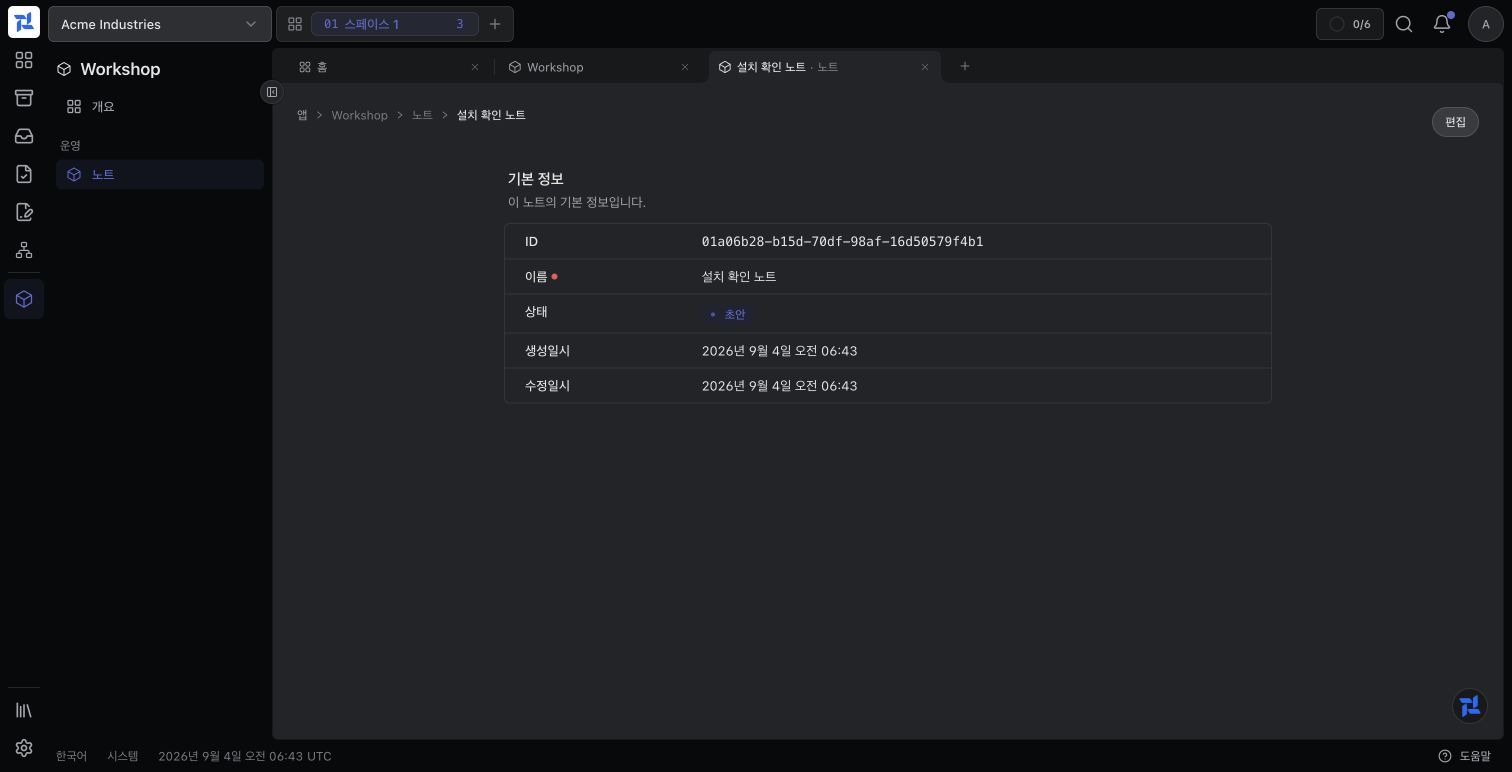
This is the actual result after completing this stage. On the left, the App Menu shows Operations → Note, added by the generator. The main pane shows the generated detail screen with ID, name, status, created and updated timestamps, plus the permission-controlled Edit action.
Each action moves the work area into a distinct state:
| Action | Screen change | What to confirm |
|---|---|---|
| Choose Operations → Note | The empty list opens | Search, status filter, and New Note action |
| Choose New Note | The create form opens in a work tab | Required name input plus save and cancel actions |
Save Installation check note | The detail screen opens | Name, Draft status, created time, and updated time |
| Select the row in the list | The right-side Inspector opens | The same basic information plus view and edit actions |
| Choose Edit | The edit form opens in a work tab | Existing name and unsaved field changes |
The generated list already provides:
- name search, status filtering, allowed-column sorting, and pagination;
- name and status columns with permission-aware view and edit actions;
- a basic-information Inspector and a separate detail work tab;
- create and edit forms with field-error feedback; and
Draft,Active, andArchivedstatus labels.
The delete route and UI are also scaffolded, but the generated Policy's
delete() method always returns false. The delete action should remain
unavailable until the App defines its retention and audit rules.
Verify from the terminal
Confirm that the host discovers the package contributions and routes:
task artisan -- nexia-apps:doctor-package-app workshop
task artisan -- route:list --path=workshop/notesThe doctor must contain no FAIL row. The route list must contain canonical /api/workshop/notes collection and member routes, together with
legacy Legal Entity compatibility routes.
Common errors
| Symptom | Cause | Fix | Confirm |
|---|---|---|---|
Package app not found at packages/workshop. Run nexia-apps:make-package-app first. | The Workshop package from the prerequisite recipe does not exist | Complete Create the first App to create packages/workshop | The Resource dry run lists the expected files as WOULD |
| Generation succeeds but Operations → Note is absent | App activation, development installation, or process refresh is incomplete | Apply all activation, development-installation, PHP, and Vite refresh commands from step 2 to the same tenant | /apps/workshop/notes opens and Note appears in the App Menu |
| The list opens but New Note or Edit is absent | The user lacks workshop.note.create or workshop.note.update | Add the required permissions to an App Role and assign it with an Access Grant in the current Legal Entity | Refreshing shows only the actions allowed by those permissions |
| Delete is absent | The generated NotePolicy::delete() denies deletion by default | Define retention and audit rules before implementing the App Policy and UI together | Delete appears only for a user allowed by the finished permission and Policy |
What to add next
The generated result is an executable work-screen baseline, not a finished note domain. Extend the coordinated surfaces according to the product requirements:
| Capability | Source to change |
|---|---|
| Body, author, category, and other domain fields | Migration, model, Controller validation, information schema, and form |
| Real lifecycle states and transitions | NoteStatus, explicit App commands, and Policy |
| Role-specific read, create, and update scope | Resource Module permissions and NotePolicy |
| Menu group, icon, and order | NoteModule::$navigation |
| CSV and XLSX export or import | Model ExportImportable and transferColumns() |
The list, detail, form, and Inspector under
resources/js/resources/notes/ share one Resource contract. When
adding a field, review the API serialization and every display surface instead
of changing only one screen.
Included files
#!/usr/bin/env sh
set -eu
# --record-owner accepts only `tenant` or `legal_entity`.
# Preview first; the command reports its package-local output without writing.
task artisan -- nexia-apps:make-package-resource workshop Note \
--record-owner=legal_entity \
--label-ko=노트 \
--label-ko-plural=노트 \
--label-zh=笔记 \
--label-zh-plural=笔记 \
--dry-run
# Run the same command without --dry-run only after reviewing the preview.
task artisan -- nexia-apps:make-package-resource workshop Note \
--record-owner=legal_entity \
--label-ko=노트 \
--label-ko-plural=노트 \
--label-zh=笔记 \
--label-zh-plural=笔记