


Nexia System Overview
Follow an App request through the Shell, SDK, and Core, and see which code you own.
Nexia System Overview
Your App in one flow
An App is an independently versioned Composer package running inside Nexia's Laravel host. You write its business behavior and React screens. You use the SDK for host services; Core supplies their implementations.
User opens an App → Shell loads its screen → screen calls its API → Core establishes tenant and actor → App authorizes and performs the operation → response updates the screen.
| Layer | You use it for | You change |
|---|---|---|
| App | Models, business rules, policies, API handlers, screens, translations | Your App repository |
| App SDK | Public services, components, types, and contribution interfaces | App imports and declarations; normally no SDK source change |
| Core | Tenant isolation, identity, authorization machinery, host runtimes, UI composition | Nothing for a normal App feature |
Start with Create an App Package, then Create a Resource. To add an existing platform capability, find it in App SDK.
What happens to a Note
The tutorial generator creates a Note model, Policy, controller, Resource
Module, routes, and frontend files in the Workshop App. These files have
separate responsibilities even though they describe one Resource.
| Step | Owner | Result |
|---|---|---|
| Open the Notes route | Shell plus App Surface | The registered React screen loads |
| Request the list | App Surface and controller | List parameters reach the backend |
| Establish the caller | Core HTTP middleware | Tenant, actor, and relevant request context are available |
| Select visible Notes | App query using SDK authorization | Only permitted rows are returned |
| Save a Note | App validation, Policy, and model | Business rules and persistence run in the tenant |
| Refresh the view | App query and screen | The user sees authoritative saved data |
A Resource descriptor publishes metadata about this capability. It does not create your business rules, choose the App overview, or replace server-side validation. See Extension Model for discovery and Build an App screen for the UI.
Central and tenant execution
| Context | Responsibility |
|---|---|
| Central | Public sites, developer documentation, tenant provisioning, platform administration |
| Tenant | A customer's Shell, App APIs, business data, and permissions |
Open App routes on a tenant domain. Central pages do not supply tenant business context. In the current runtime, tenant business data lives in tenant databases; organizational selection stays inside that tenant. See Tenant and context.
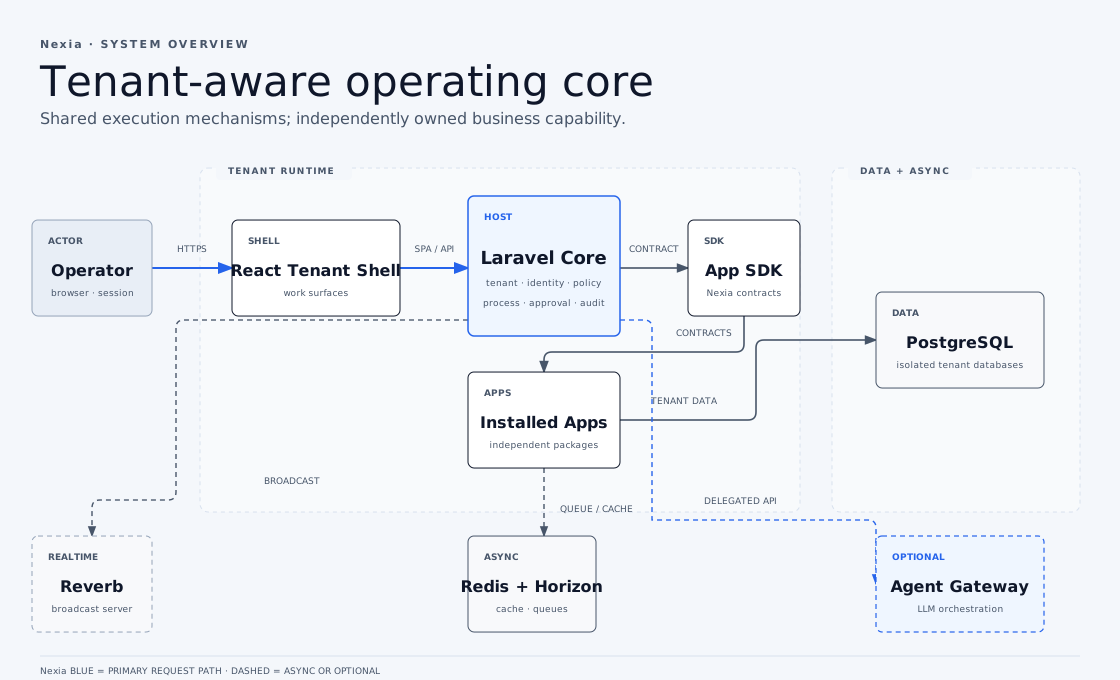
Apps share the Laravel runtime; installing a new App does not create a separate service. The optional Agent Gateway has a separate runtime and invokes protected tenant APIs with delegated authority. PostgreSQL holds durable business data; Redis, search indexes, and browser state serve narrower operational purposes.
Keep the package boundary
Use Nexia\* for PHP host contracts. Use @nexia/sdk for frontend
types and pure utilities, and /host for bound components, hooks, and services.
App code never imports Core App\*, Core frontend aliases, or another App.
When another App owns the data you need, choose a supported reference or event flow in Choose a cross-App integration. A host service contract must remain meaningful without any particular App.
The generator creates the standard wiring; your App still owns every business rule. Authentication, installation, and visible navigation are not grants. Permissions and roles explains that decision.
Go deeper when needed
- App Package structure — locate the files you will change.
- Tenant Web Runtime — routing and browser execution.
- Octane·FrankenPHP Runtime — long-lived PHP workers.
- App lifecycle — package loading, activation, installation, and access.