


Enable the Agent Gateway
Fill one service token, start the local Agent Edge and Gateway, and verify both runtime boundaries.
Enable the Agent Gateway
This reference is for Nexia maintainers who already have authorized access to the private host environment. Core is not distributed to external developers. These host commands are not prerequisites for the public CLI and cloud sandbox; start with the quickstart.
Use steps 1–3 to run Agent behavior locally, then configure a provider and model in step 4 before trying a chat turn. Health confirms the runtime boundary; a completed authenticated turn confirms the model and stream path. The production section is only for operators deploying the Gateway.
What you build
A running local Agent Edge and Gateway. Edge handles the browser's one-time direct-SSE ticket and streams the response; the Gateway is the Python LangGraph sidecar behind the Shell's Agent chat. It accesses business data through delegated Laravel tenant API calls. Its separate PostgreSQL connection stores LangGraph checkpoints for conversation recovery.
Ordinary App, Core, and SDK work does not need it. Enable it only to exercise Agent behavior or to change the Gateway itself.
Before you start
- Your authorized private Core checkout is prepared through Nexia’s internal setup procedure, with zero failures in the
task doctorSummary - A terminal at the Core repository root
The RS256 signing keypair already exists: task setup ran nexia-agent:generate-keys, which wrote private.pem and public.pem to storage/app/agent-keys/. Do not generate it again.
1. Fill the service token
Keep an existing working token. Generate a value only when the local setting is empty.
The one value you fill by hand locally is the shared secret the Edge adapter and Gateway present to Laravel's /internal/agent/* endpoints. AGENT_SERVICE_TOKEN in .env ships empty, and Laravel refuses every request while it is empty — the middleware fails closed.
token="$(openssl rand -hex 32)"
sed -i '' "s/^AGENT_SERVICE_TOKEN=.*/AGENT_SERVICE_TOKEN=${token}/" .env
awk -F= '/^AGENT_SERVICE_TOKEN=/ { print length($2) }' .envThe output must be 64; the token itself stays in .env. .env is on the Octane watch list, so the Laravel side rereads it as soon as you save.
2. Start the agent mode
task dev:up:agentThis adds agent-gateway, the tracked local agent-gateway-edge, and the
local agent-analysis controller on top of core mode. Compose injects the
.env value you just set into the Agent runtime boundaries, so this command is
also the propagation step. Direct SSE is the local default; it needs no ignored
helper process.
Agent answer tokens use that direct-SSE path, not Reverb. When .env selects
the Reverb broadcaster or supplies a browser Reverb key, the same command also
starts reverb. Its WebSocket channel accelerates agent.task.changed cache
invalidation and the Shell's other realtime events; polling remains the Agent
task fallback when realtime transport is absent.
3. Verify both local boundaries
The local Edge adapter has a process health endpoint:
curl -fsS http://localhost:8787/_local/health{"status":"ok"} proves that the tracked adapter is accepting requests. It
does not by itself prove a ticket exchange or a browser stream.
While booting, the Gateway makes one bounded tool-manifest fetch from Laravel, then keeps self-healing in the background if Laravel was not ready. Until one lands, /agent/health answers 503 degraded, so give it a moment:
curl -s http://localhost:8100/agent/health"status": "ok" and a non-zero tool_count in the JSON are the success evidence. The port is AGENT_GATEWAY_PORT from .env (default 8100).
If it stays degraded, the token is the most likely cause:
task agent:logsA Laravel refusal logged as 503 (token unset) or 401 (values differ between the two sides) sends you back to step 1.
4. Configure a chat model
Chat providers, models, and API keys are central catalog data, not environment
variables. Sign in to Central Admin at /admin/login on the Core host, then
configure them under the Agent navigation group. The standard local URL is
http://localhost:8080/admin/login; if an isolated worktree uses another port,
replace only the host and port with that source folder's Core URL. Laravel sends the
resolved {provider, model_id, api_key} candidates with each prepared turn, so
neither the Gateway process nor .env holds chat-model keys.
| What to configure | Where | Direct path on the Core host |
|---|---|---|
| Provider API keys | Central Admin → Agent → Provider Keys | /admin/agent-provider-keys |
| Model catalog | Central Admin → Agent → Agent Models | /admin/agent-models |
| Primary grade assignments | Central Admin → Agent → Agent Grades | /admin/agent-grades |
| Router and Worker assignments | Central Admin → Agent → Agent Roles | /admin/agent-role-models |
4.1 Configure the shared key for each provider
Agent → Provider Keys contains one seeded row for each provider. Open the provider you want to use, enter its API key and a Base URL when required, and turn on Visible. Obtain the API key from that provider's management console. When editing an existing row, leaving the API key field blank preserves the stored key.
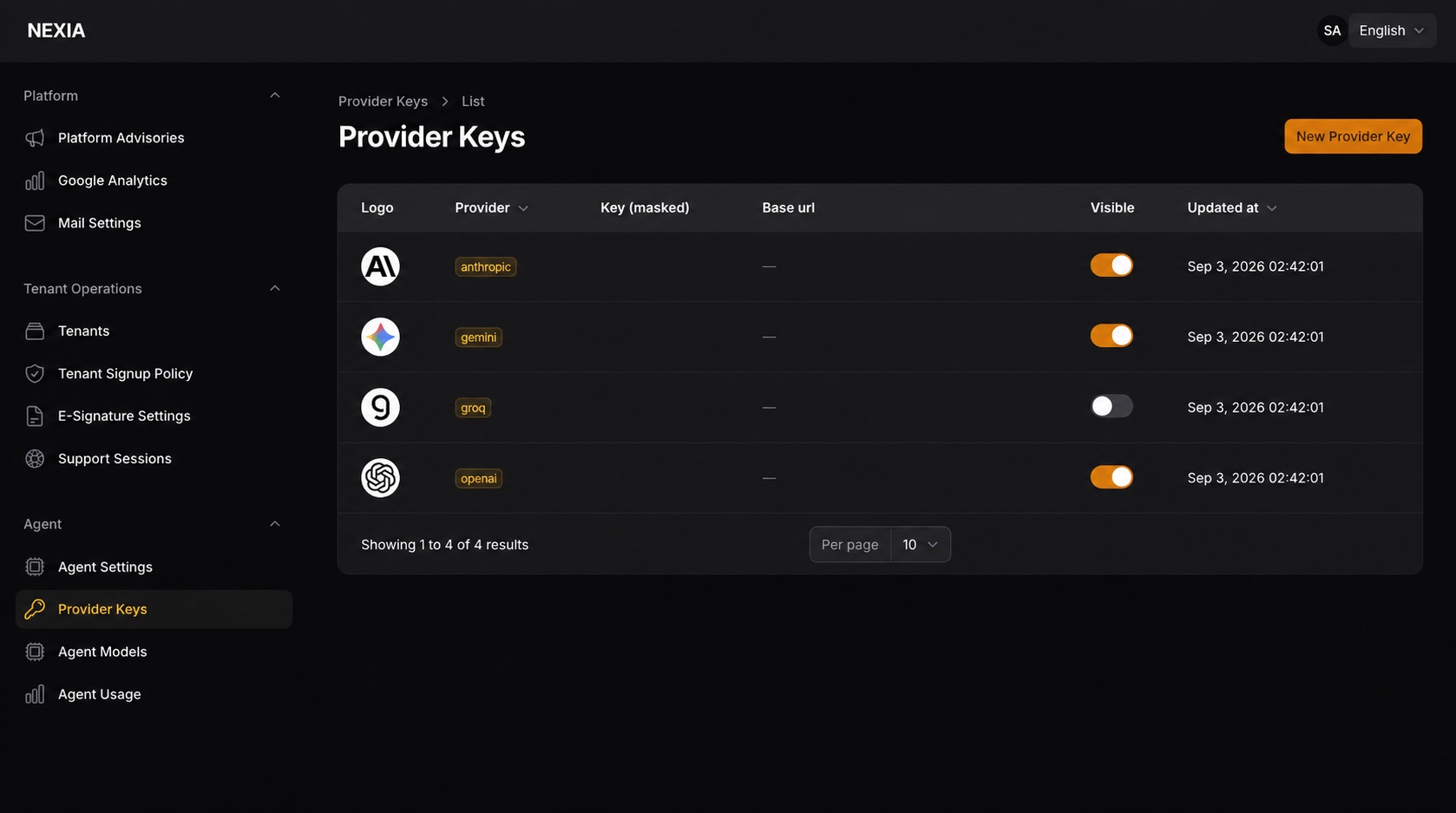
| Provider | API key | Base URL |
|---|---|---|
| Anthropic | Required | Leave blank |
| OpenAI | Required | Leave blank |
| Groq | Required | Leave blank |
| Gemini | Required | Leave blank |
| Z.ai | Required | https://api.z.ai/api/paas/v4 |
| Hugging Face | Required | https://router.huggingface.co/v1 |
| Ollama | Leave blank | An Ollama URL reachable from the Gateway container; the local default is http://host.docker.internal:11434 |
Z.ai, Hugging Face, and Ollama are unusable without a Base URL. The Gateway adapters for the other providers do not use a Base URL even if one is entered.
4.2 Configure models for each provider
Next, edit or create the models under Agent → Agent Models. Provider must
match the provider whose key you configured above. Model ID is the real ID
sent to the provider API, not a display label. Use the rows in your environment as the starting point; confirm the selected model is available to your provider account:
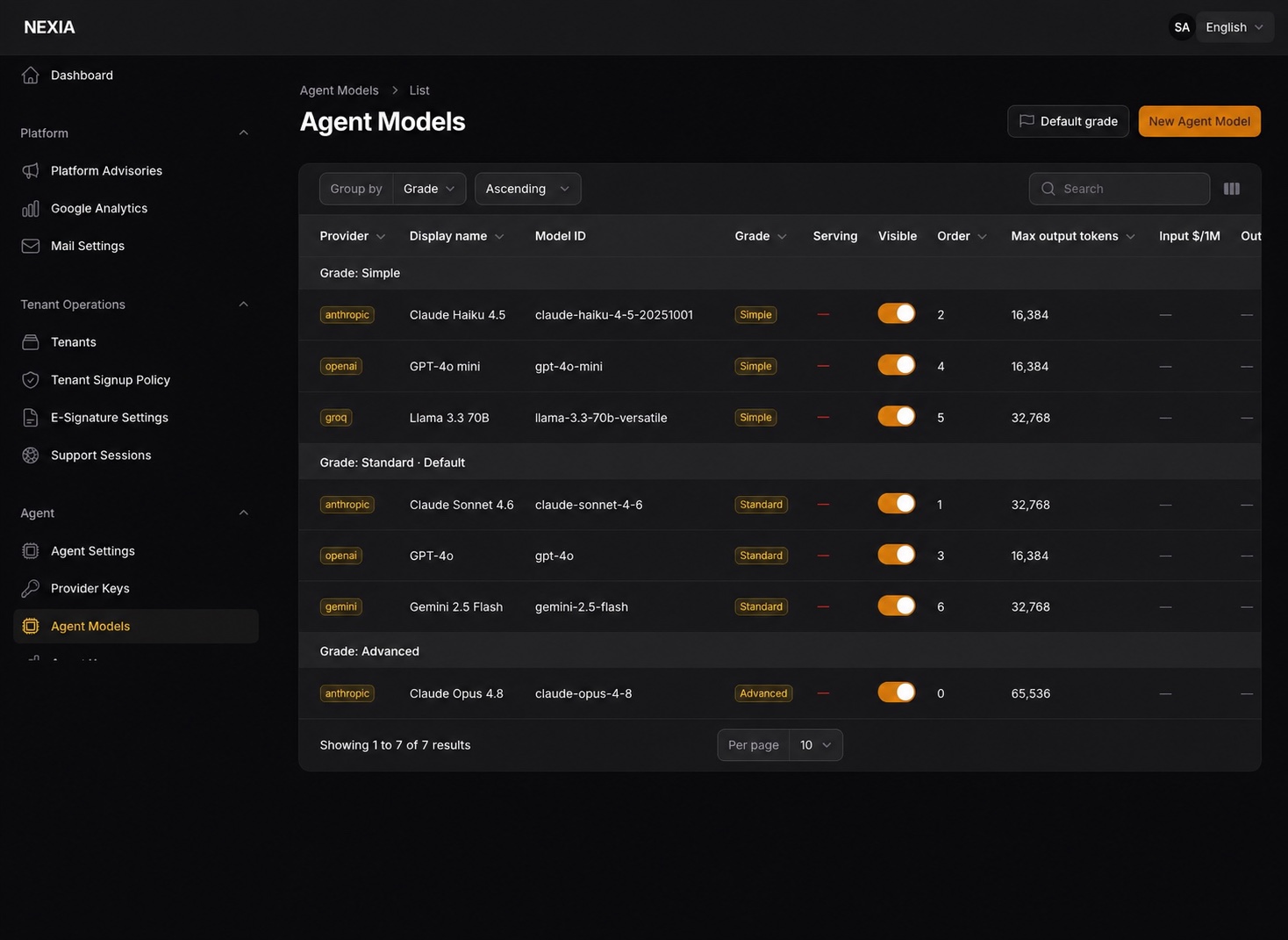
Turn on Visible for each model you want to offer, and keep its maximum
output and context-window values within the provider model's limits. When
several models share a grade, the lowest Sort order is attempted first. The
list's Serving marker identifies the first model for each grade using the
shared platform keys.
A fresh chat resolves its available grade from the platform model catalog. A model appears in chat only when both its Provider Keys row and Agent Models row are Visible and, except for Ollama, the provider has a usable API key.
Open Agent chat in your tenant, select an available grade, and send a short message. A completed response confirms provider configuration and the browser stream. If no model appears, check provider visibility, model visibility, and the provider credential.
Production deployment
The loopback Edge adapter is local development infrastructure. Production uses
the Worker and Container declared in services/agent-gateway-edge/wrangler.jsonc.
From that directory, register the Cloudflare secrets before deploying:
pnpm install --frozen-lockfile
pnpm exec wrangler secret put AGENT_EDGE_TOKEN
pnpm exec wrangler secret put AGENT_SERVICE_TOKEN
pnpm exec wrangler secret put AGENT_CHECKPOINT_DSN_TEMPLATE
# Only for hosted screen-search embeddings:
pnpm exec wrangler secret put AGENT_SCREEN_SEARCH_EMBEDDING_API_KEY
pnpm run typecheck
pnpm run test
pnpm exec wrangler deploy --dry-run
pnpm exec wrangler deployLaravel Cloud owns the matching infrastructure values:
AGENT_SERVICE_TOKEN=<same value as Cloudflare>
AGENT_GATEWAY_URL=https://<worker-host>
AGENT_EDGE_TOKEN=<same value as Cloudflare>
AGENT_PUBLIC_STREAM_URL=https://<worker-host>/browser/agent/stream
AGENT_JWT_PRIVATE_KEY_BASE64=<Laravel signing key>
AGENT_JWT_PUBLIC_KEY_BASE64=<matching public key>AGENT_EDGE_TOKEN authenticates Laravel requests to protected Worker
/agent/* routes. AGENT_SERVICE_TOKEN authenticates the Worker and Gateway to
Laravel /internal/agent/* routes. The browser receives only an opaque ticket;
never send either shared secret or the delegation JWT to it. The public stream
URL must be absolute HTTPS with the exact path above and no credential, query,
fragment, or redirect.
wrangler.jsonc owns the canonical screen-search provider binding. Optional
base URL and API key values use the same AGENT_SCREEN_SEARCH_EMBEDDING_*
contract and the Worker forwards only those names into the Container.
After deployment, an Edge-token-authenticated /agent/health request proves
the protected Worker-to-Container path; a real authenticated browser turn is
still required to prove ticket exchange and direct SSE.
Optional screen-search reranking
Screen-search embeddings are separate Gateway infrastructure and do not select
a chat model. The default none, or an incomplete optional configuration,
leaves chat running with lexical screen order. An unknown provider or unsafe
hosted URL is a deployment error and prevents Gateway startup:
AGENT_SCREEN_SEARCH_EMBEDDING_PROVIDER=none
AGENT_SCREEN_SEARCH_EMBEDDING_BASE_URL=
AGENT_SCREEN_SEARCH_EMBEDDING_API_KEY=none preserves the permission-filtered lexical order returned by Laravel.
ollama keeps query and screen labels at the deployment-owned endpoint;
gemini and zai send that screen-search text to the selected hosted provider
and require AGENT_SCREEN_SEARCH_EMBEDDING_API_KEY. Model identifiers are
code-owned so two instances cannot silently use incompatible vector spaces.
Hosted endpoint overrides must be absolute HTTPS URLs without userinfo, query,
fragment, or whitespace. Invalid overrides fail at startup before the Gateway
can send a credential or search text.
The /agent/health response reports screen_search_embedding.provider,
model, profile_fingerprint, readiness, and missing_configuration without
returning an endpoint or credential. readiness proves configuration shape,
not live provider reachability; a request-time provider failure keeps lexical
ordering and emits only a rate-limited provider/failure classification. It does
not log the query or provider response body. Only the three
screen-search-prefixed environment names are accepted; stale generic or
provider-specific names are ignored.
If you are changing the Gateway itself
| Purpose | Command |
|---|---|
| Follow logs | task agent:logs |
| Restart the service | task agent:restart |
| Open a container shell | task agent:shell |
| Install the uv workspace | task agent:sync |
| Run the pytest suite | task agent:test |
When you return to ordinary work, task dev:up:core stops both Agent services again.
Verify
| Check | Pass condition |
|---|---|
| Token configured | A nonempty shared value reaches Laravel, Edge, and Gateway; a newly generated token above has 64 characters |
| Containers running | task status lists agent-gateway-edge, agent-gateway, and agent-analysis |
| Local Edge healthy | /_local/health on :8787 returns {"status":"ok"} |
| Gateway healthy | /agent/health returns "status": "ok" |
| Optional reranker configuration | /agent/health reports screen_search_embedding.readiness as disabled, ready, or misconfigured |
Common mistakes
Running task dev:up:agent without the token. The local Edge adapter cannot become healthy, while the Gateway never receives the manifest and /agent/health stays at 503 degraded. Laravel's EnsureServiceToken does not silently let an unconfigured deployment through.
Looking for chat model API keys in .env. AGENT_SCREEN_SEARCH_EMBEDDING_API_KEY belongs only to optional screen-search reranking. Chat model keys are catalog data under Central Admin → Agent → Provider Keys.
Regenerating the keypair to fix a problem. nexia-agent:generate-keys aborts when keys already exist. --force is for a deliberate rotation: deploy the new pair, wait out the fixed 300-second outstanding-token lifetime, then remove the old keys.
Diagnosing from the unavailable banner alone. The same banner represents service_unavailable and not_configured. Find the error code using the displayed reference and task agent:logs. For not_configured, check the provider key, required Base URL, and model configuration in Central Admin. Gateway health may remain ok because it does not validate the chat-model catalog. For service_unavailable, inspect the runtime logs and boundary health checks.
Treating the first 503 as a failure. Right after boot the manifest fetch may still be retrying. Investigate the token and logs only when degraded persists past the retries.
Next
- Environment Variables — look up every Agent, Edge, Gateway, and optional-service value by owner.
- Nexia System Overview — see where the Gateway meets Core through delegated API calls.
- HTTP middleware — why the
service-tokenguard is not an App route contract. - Configuration Ownership — the rule for deciding what is env and what is catalog.