


Examples
Create a Contributor
Add publish and archive permissions to the Workshop Note and observe them in the Role editor.
Example type Recipe
Overview
Create a Contributor
This recipe continues the Workshop App and Note Resource from the
Resource Generator. It adds publish and
archive as business permissions while keeping the generated read, create,
update, and delete permissions.
What appears when you finish
| Result | Where to see it |
|---|---|
WorkshopWorkflowPermissions | packages/workshop/src/Contribution/ |
workshop.note.publish and workshop.note.archive | Permission catalog |
| Publish and archive choices | Settings → Roles → New role → Permissions → Workshop → Note |
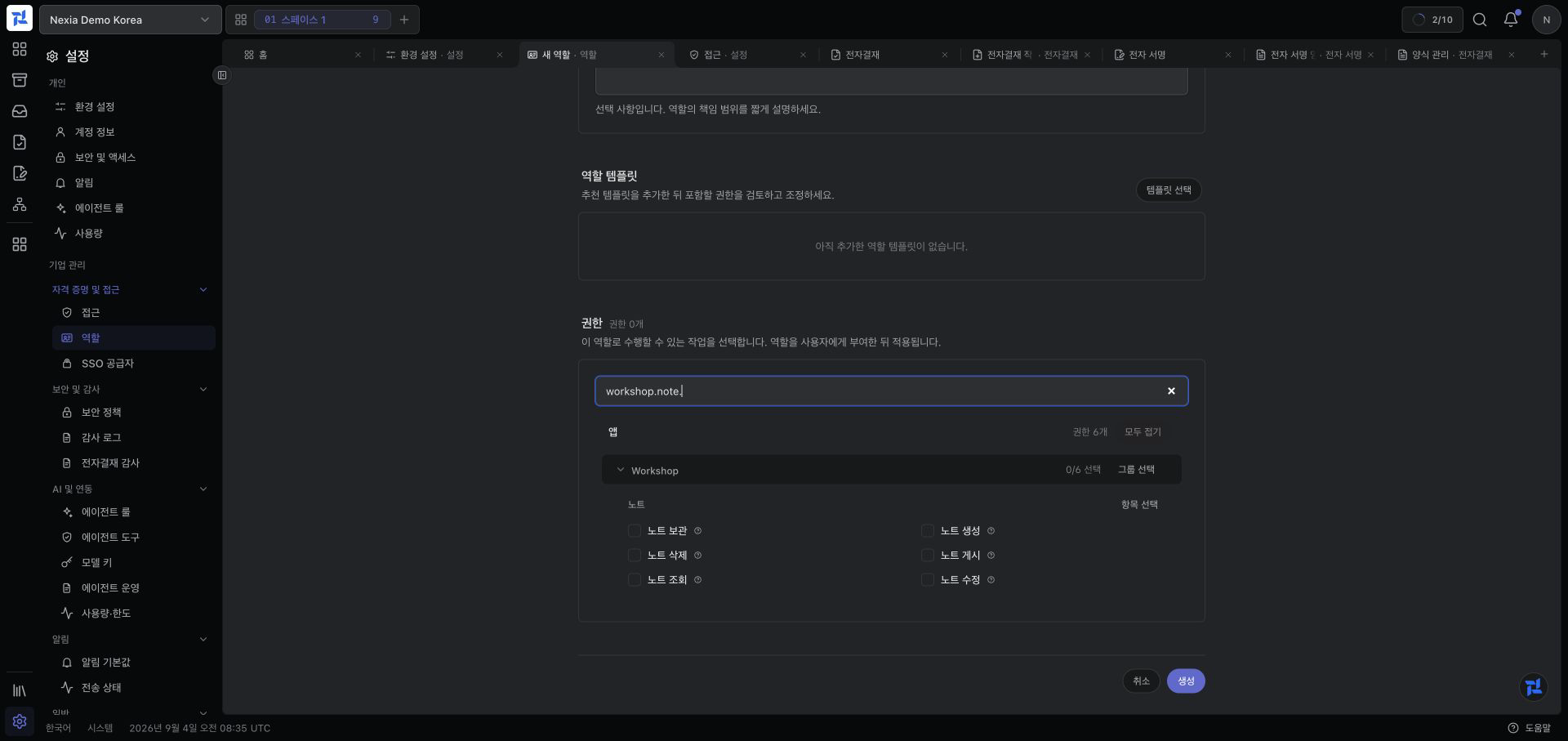
This is the actual catalog after applying the recipe and synchronizing the
tenant. Searching for the stable workshop.note. prefix shows the four
Resource Generator permissions together with Publish Note and Archive
Note.
A Contributor publishes capability metadata. It does not create App navigation or add buttons to the Note screen. Routes, Policies, and frontend affordances must consume these permissions to complete the business behavior.
Which contract it implements and how Core receives it
WorkshopWorkflowPermissions does not extend a Core class. It implements the
App SDK Nexia\Permission\Contracts\PermissionContribution interface and returns static
permission definitions from catalogPermissionDefinitions().
WorkshopAppManifest::contributionLocations()
→ NexiaContributionRegistry::classesImplementing(PermissionContribution::class)
→ WorkshopWorkflowPermissions::catalogPermissionDefinitions()
→ AppRegistry::permissionDefinitions()
→ PermissionContributionRegistry → PermissionCatalog
→ nexia-access:sync-permissions materializes tenant permission rows
→ Access catalog API sends permissions for installed Apps to the role editorThe generated NoteModule represents the whole Resource, so it extends
AbstractResourceModule and contributes CRUD permissions through
ContributesResourcePermissions. Publish and archive are separate business
actions rather than baseline Resource CRUD, so this recipe uses a small
standalone class that directly implements only PermissionContribution. Core
discovers the file because a concrete class inside a registered discovery root
implements that SDK interface, not merely because the file was copied there.
Discovery and synchronization are separate stages. Discovery adds the code
definition to the catalog; nexia-access:sync-permissions materializes that catalog in
the tenant database. Neither stage grants the permission to a user.
1. Add the Contributor
WorkshopAppManifest already registers src/Contribution/ as a discovery
root. Copy the example there:
cp docs/developers/examples/contributor/WorkshopWorkflowPermissions.php \
packages/workshop/src/Contribution/WorkshopWorkflowPermissions.phpThe implementation uses only public App SDK contracts:
final class WorkshopWorkflowPermissions implements PermissionContribution
{
public static function catalogPermissionDefinitions(): array
{
return PermissionDefinition::many(
appKey: 'workshop',
resource: 'note',
actions: ['publish', 'archive'],
assignmentScope: AssignmentScope::LegalEntity,
);
}
}PermissionDefinition::many() normalizes the actions to
workshop.note.publish and workshop.note.archive.
2. Discover and synchronize it
Inspect discovery and the planned tenant change first:
TENANT=abc123def456 sh docs/developers/examples/contributor/verify.shThen synchronize the intended tenant:
task artisan -- nexia-access:sync-permissions --tenant=abc123def456 --no-ansiSynchronization grants nothing automatically. An access administrator still adds the permissions to a Role and assigns that Role through a Legal Entity Access Grant.
3. Change the Contributor
For example, replace archive with restore:
actions: ['publish', 'restore'],Refresh runtime discovery and synchronize again. Removing
workshop.note.archive from code does not immediately remove its tenant row or
existing assignments. Review consumers and Access Grants, then use the explicit
permission-retirement workflow.
Common errors
| Symptom | Cause | Fix | Confirm |
|---|---|---|---|
| Doctor does not find another contributor | The class namespace is wrong or the file is outside the Manifest contribution root | Keep WorkshopWorkflowPermissions.php under packages/workshop/src/Contribution/ and confirm that it implements PermissionContribution | verify.sh prints Contributor discovered. |
| Sync reports a duplicate key | A new action overlaps a CRUD key already owned by NoteModule | Publish only separate business actions such as publish and archive, not the baseline Resource actions | The dry run lists only workshop.note.publish and workshop.note.archive as new changes |
| The permission is visible in Roles but no button exists | A Contributor publishes definitions; it does not create a Route, Policy method, or frontend action | Implement the App Route, Policy, and UI for the business action | An allowed user sees the implemented action and its backend request succeeds |
| A Role contains the permission but the user is denied | The Role is not assigned through an Access Grant in the current Legal Entity | Assign the Role to the user in the current Legal Entity | Selecting that Legal Entity allows the request |
Included files
Permission contributor
docs/developers/examples/contributor/WorkshopWorkflowPermissions.php<?php
declare(strict_types=1);
namespace Amuzcorp\Nexia\Workshop\Contribution;
use Nexia\Permission\AssignmentScope;
use Nexia\Permission\Contracts\PermissionContribution;
use Nexia\Permission\PermissionDefinition;
/** Permissions for Note workflow actions that are not generated CRUD actions. */
final class WorkshopWorkflowPermissions implements PermissionContribution
{
public static function catalogPermissionDefinitions(): array
{
return PermissionDefinition::many(
appKey: 'workshop',
resource: 'note',
actions: ['publish', 'archive'],
assignmentScope: AssignmentScope::LegalEntity,
);
}
}Refresh and inspect discovery
docs/developers/examples/contributor/verify.sh#!/usr/bin/env sh
set -eu
: "${TENANT:?Set TENANT to the practice tenant ID shown by tenants:list.}"
test -f packages/workshop/src/Contribution/WorkshopWorkflowPermissions.php
task artisan -- nexia-runtime:refresh-runtime-caches --if-route-cached --no-ansi
task artisan -- nexia-apps:doctor-package-app workshop --no-ansi
task artisan -- nexia-access:sync-permissions --tenant="$TENANT" --dry-run --no-ansi
printf '%s\n' 'Contributor discovered. Apply the permission sync, then inspect Settings > Roles > New role.'